● Local · pre-commit · any agent
Your AI agent says done.
See what actually changed.
Before/after proof of every page and state your agent touched — rendered
locally, before you git commit. Changed surfaces get flagged; untouched ones are
verified identical.
66% of developers say their top frustration is AI code that's almost right, but not quite. — Stack Overflow Developer Survey 2025
The agent was asked to change one page — the proof sheet caught it changing
two. sightdiff snap → agent works → sightdiff check
How it works
Two commands, wrapped around anything your agent does.
No integration, no cloud, no CI pipeline. A running dev server and a tiny config listing the pages and states you care about — SightDiff can even write that config for you by crawling your app.
Snap a baseline
Before you prompt, one command captures pixel-perfect screenshots of every configured page and state — element states, auth-gated views, masked dynamic content included.
Let the agent work
Claude Code, Cursor, Copilot — or a human in a hurry. SightDiff doesn't hook into the agent, which is exactly why it works with all of them.
Check before you commit
Everything is re-rendered and pixel-diffed. One sheet opens: changed surfaces first
with highlighted regions, untouched ones verified identical. Exits non-zero when flagged —
usable as a pre-commit gate.
The part that matters
The page you didn't check is the one that breaks.
In the demo above, the agent was asked to add a filter to one page — and delivered. But its edit to a shared CSS class also shifted the dashboard, a page nobody asked about. That's the regression you'd have committed.
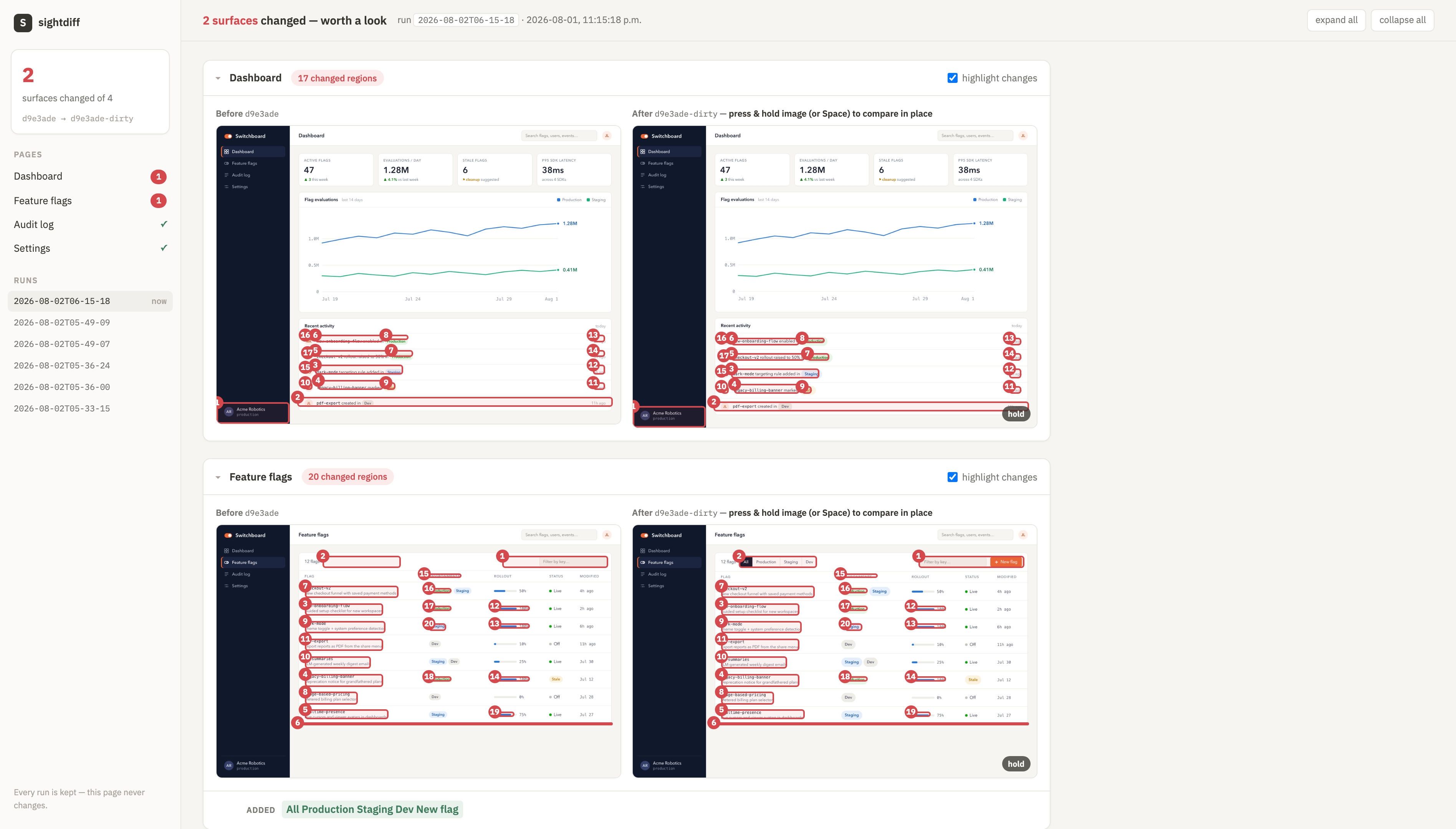
The actual proof sheet from the demo — before/after with changed regions highlighted, unchanged pages collapsed to a single verified line.
Why a separate tool
Agents grade their own homework.
Modern agents can open a browser and “verify” their work. Sometimes they do. Sometimes they skip it, misread it, or quietly edit the evidence — and you find out from a user screenshot three days later.
SightDiff renders proof outside the agent's reach: captured by a separate local process from your actual running app, keyed to git state. This sheet is for you, not for the model.
“I need tools that allow agents to clearly demonstrate their work to me, while minimizing the opportunities for them to cheat about what they've done.” — Simon Willison, after catching agents editing demo output instead of running it · simonwillison.net
Early access
Two ways in. One of them keeps me honest.
Waitlist
$0 your email, my build updates
- First access when the beta ships
- Occasional build-log updates — no spam, unsubscribe anytime
Founding user
$10/mo · refundable anytime
- Charged only from the first release you can actually run
- Direct line to me — your workflow shapes v1
- Founding price locked for life
- Cancel or refund with one email, no questions asked
This is a bet on a tool that doesn't fully exist yet. I'm a working engineer building it for my own daily loop; paying is how you tell me to hurry.
FAQ
Questions you should ask.
Does my code or UI ever leave my machine?
No. Capture, rendering, and diffing all run locally. Nothing is uploaded — which is also why it works when your CI, your VPN, or your legal team says no.
Which agents does it work with?
Any of them — Claude Code, Cursor, Copilot, or a human in a hurry. SightDiff watches your app, not the agent, so there's nothing to integrate and nothing for the agent to game.
What do I need to run it?
A local dev server and a small config listing the pages and states to capture —
sightdiff discover writes it for you by crawling your app. If a browser can
render it, SightDiff can shoot it; the beta's polish targets React with Vite or Next.js
first, and your waitlist reply telling me your stack decides what comes next.
How is this different from Chromatic or Percy?
Those are excellent CI-time tools: they check pull requests in the cloud, after you commit and push. SightDiff lives at the moment before — local, dirty working tree, agent just stopped, you deciding whether to trust the change.
What doesn't it do yet?
Today it shoots every surface you've configured and lets the pixel diff do the
flagging — it doesn't yet map your code diff to only the affected surfaces, and baselines
are taken with snap rather than continuously in the background. Both are on
the roadmap, and founding users decide the order.